
Keys invoicing
Invoice your own customers by card, cash or check
Create an invoice in the Keys web portal and Keys texts and emails it to your customer. A card invoice carries a payment link; cash and check are recorded as paid. Keys takes no fee on invoices.
Who it is for
Locksmiths billing customers they found themselves: a repeat client, a business account, a walk-in. These are your own jobs, not Keys jobs, so Keys takes nothing from them, and the invoice, the payment and the record sit in the same account as the rest of your work.
What invoicing does today
Card with a payment link
Keys texts and emails your customer a link to pay by debit or credit card. The invoice is due in 5 days, and the money goes to your own Stripe account.
Cash, recorded as paid
For a customer who already paid you in cash, the invoice is created as paid and sent to them by text and email for their records.
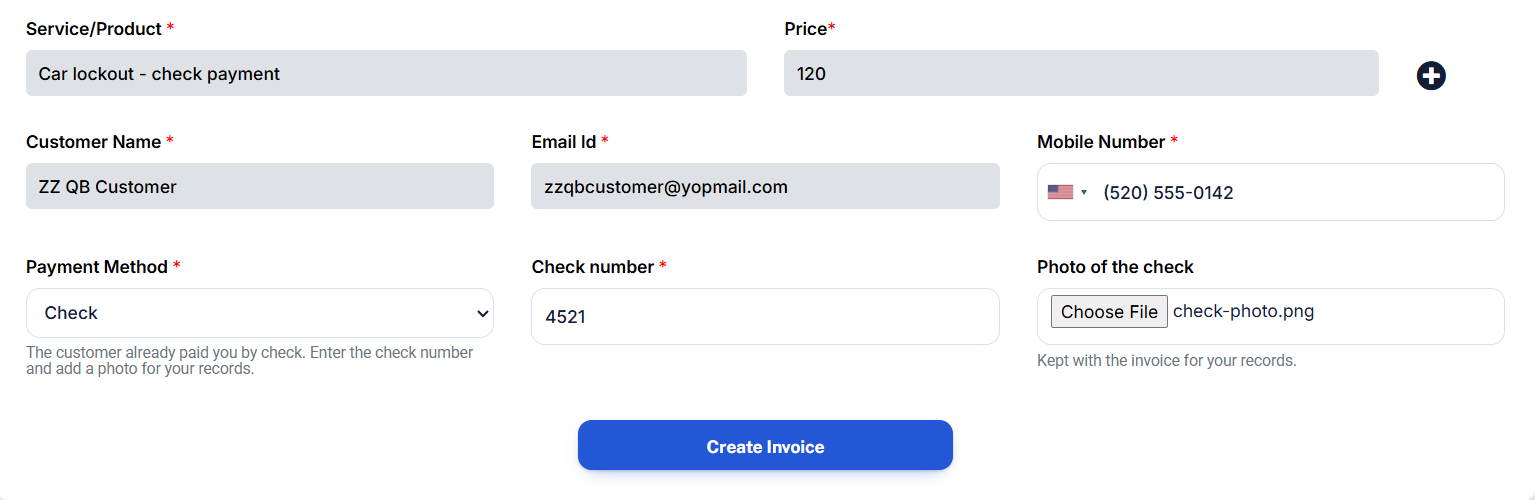
Check, with its number and photo
Enter the check number and add a photo of the check. The invoice is created as paid, and the photo is kept with it.
Several lines
Add as many services or products as the job had, each with its own name and price.
Refunds
Refund a paid card invoice in full or in part from your invoice list. Cash and check were paid outside the card system, so there is nothing to refund there.
QuickBooks Online
Connect your QuickBooks Online company and Keys sends invoices over: cash and check straight away, card invoices once paid, with the check photo attached.
What an invoice costs
A $1,000 invoice to your own customer.
| Paid by | Keys | Card fee | You keep |
|---|---|---|---|
| Card | $0 | $29.30 | $970.70 |
| Cash or check | $0 | $0 | $1,000 |
A card payment is charged on your own Stripe account at Stripe's standard US price, 2.9% + 30¢; cards from outside the US add 1.5%. There is no monthly fee. Full pricing
Where to find it
In the Keys web portal, open Customers, then Invoices, then Create invoice. Add the lines, the customer's name, email and mobile number, and choose how they pay. The invoice list shows each invoice with its status and a link to it.
Technicians can also send invoices from the Keys app.
Price and limits
- Invoicing is part of your Keys provider account. Keys takes no fee on invoices and charges no monthly fee.
- The Invoices page opens once your business has finished payout setup with Stripe.
- Card invoices need your Stripe account to be able to take card payments. If it cannot, the portal says so before it creates the invoice.
- A refund is paid out of your Stripe balance, so the balance has to cover it.
- Refunds of invoices are not sent to QuickBooks Online; record them there yourself.
- Jobs booked through Keys are paid through Keys and carry the Keys fee; invoices are for your own customers.
Get started
Register your business on Keys and finish payout setup, then open Customers, then Invoices, in the web portal. The Keys app is free on iPhone and Android.



Frequently asked questions
What is the best invoicing app for locksmiths?
It depends on how you work. Keys invoicing comes with a free Keys provider account and takes no fee: invoice your own customers by card, cash or check, and Keys texts and emails the invoice. A card payment costs only Stripe's standard fee, cash and check cost nothing, and paid invoices go to QuickBooks Online if you connect it. General field-service products usually include invoicing in a paid monthly plan.
What does it cost to send an invoice through Keys?
Keys takes no fee on invoices to your own customers and charges no monthly fee. A card payment is charged on your own Stripe account at Stripe's standard US price, 2.9% + 30¢ (cards from outside the US add 1.5%), so on a $1,000 card invoice you keep $970.70. Cash and check payments cost nothing.
How does my customer pay a card invoice?
Keys texts and emails them a link. They pay by debit or credit card on that page, the invoice is due in 5 days, and the money goes to your own Stripe account.
Can I record cash and check payments?
Yes. Choose Cash or Check when you create the invoice and it is created as paid, then sent to the customer by text and email for their records. For a check, enter the check number and add a photo of the check if you want; the photo is kept with the invoice.
Can I refund an invoice?
A paid card invoice can be refunded in full or in part from your invoice list. The refund is paid out of your Stripe balance, so the balance has to cover it. Cash and check were paid outside the card system, so there is nothing to refund.
Does Keys invoicing work with QuickBooks?
Yes, with QuickBooks Online. Once you connect your company, Keys sends invoices over: cash and check straight away and card invoices once they are paid, with the check photo attached. Refunds of invoices are not sent, so record those in QuickBooks yourself.
Can my technicians send invoices?
Yes. Owners create invoices in the web portal under Customers, then Invoices, and technicians can send them from the Keys app.